


Introducing “Winter for Windows” – the fun festive desktop addition for the season
A few weeks ago, I noticed in my social feed that Festivitas, the popular application for macOS, had a new version out. I was immediately jealous for my Windows PC because Festivitas is only for Apple-related ecosystems and doesn’t have a Windows port.
Inspired by Scott Hanselman’s recent port of the new Edge Light feature from macOS Tahoe to a WPF app, which he “vibe-coded” using GitHub Copilot and Claude Sonnet 4.5, I thought I’d give it a go and do some vibe-coding myself.
It went pretty well.
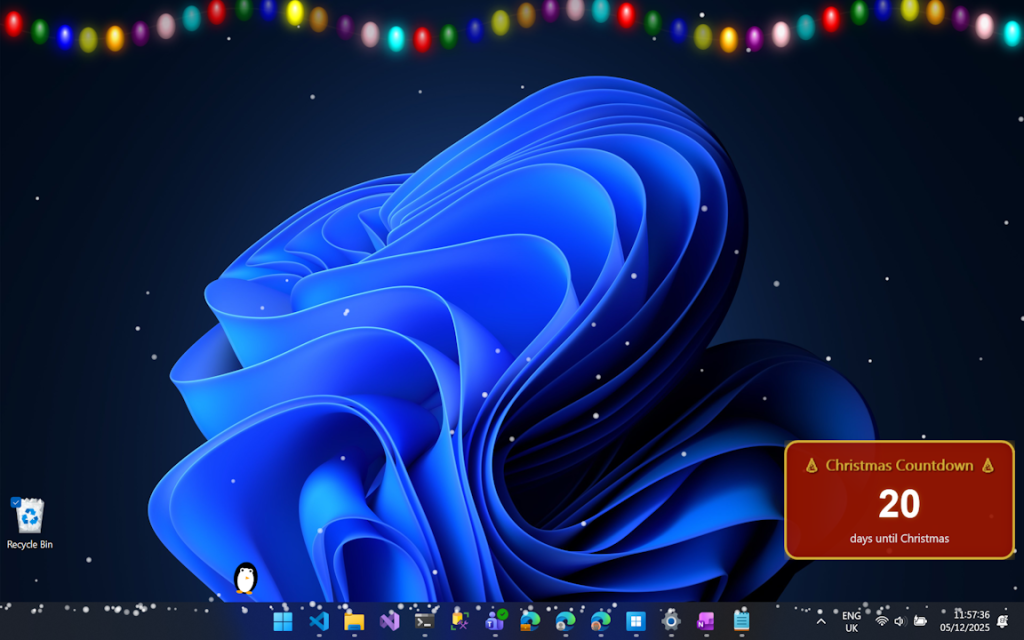
I actually didn’t make ANY changes to the code that was output, or even look at it. Instead, I focused on being intentional about the plan, what I wanted and how I wanted it to work, and then tested the outcomes. I also periodically explicitly asked for security and code reviews.
I chose to build the whole thing within the Windows Terminal, using the GitHub Copilot CLI:
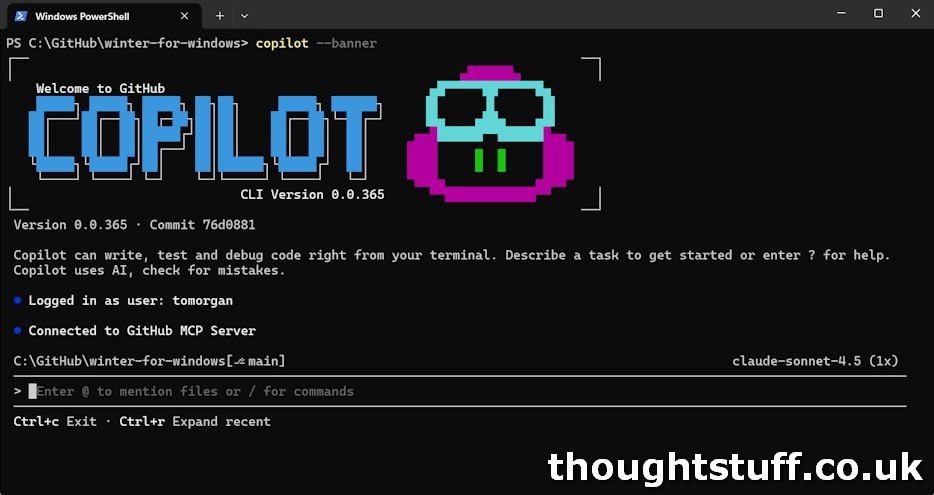
As a developer, this was quite a different experience – in all my previous use of LLMs to assist with code development I’ve been able to see the output code. However, this approach made that much harder so I had to rely more on testing the output. (Of course, I could have just opened Visual Studio Code, but I was experimenting with not doing that).
How it’s built
It feels only right to produce this part of the blog post directly from Copilot, seeing as it was 100% responsible for producing this code:
Winter for Windows is built on .NET 8 WPF and follows a clean, maintainable architecture designed around transparent overlay windows. The codebase is organized into two primary layers: Services and Overlays. At the heart of the application is the EffectManager, which orchestrates the lifecycle of each festive effect, while SettingsService handles persistent storage of user preferences in JSON format. The OverlayWindowBase class provides a reusable foundation for all visual overlays—handling the tricky bits like transparent, click-through windows that sit atop everything without interfering with your work. Each effect (Fairy Lights, Snow, Penguin, and Christmas Countdown) inherits from this base class and implements its own rendering and animation logic using WPF’s animation system running at 30 FPS. The app runs entirely from the system tray using Hardcodet’s NotifyIcon library, with no main window to clutter your screen. The entire structure is intentionally lightweight—just a handful of core classes managing window states, effects, and settings—making it easy to extend with new festive features or customize to your heart’s content.
What was it like?
It was a lot of fun, actually. I did it over the weekend, leaving the terminal window open and giving it commands, then going off to do other stuff whilst it worked. I liked that I could drop in and out of it, and it didn’t require the usual “ramping up” headspace that I usually need when doing development, including AI-assisted development in an IDE. It’s the closest I’ve come to hands-off development, and I was impressed with the results.
There are a million caveats though, including:
- It’s the most simple of simple examples. I don’t know what it would be like on something more complex.
- Actually, I do. I asked it to include Updatum for easier updates later. I added it, but it didn’t work. I went round and round the houses with Copilot about this, and each time it thought it fixed it, but it hadn’t. Eventually it started to repeat itself, so I cut my losses and removed it. I could do that, because this is just a fun project, but if it was a business requirement then we would have had a problem. (again, I could do this myself manually or with Agent mode in Visual Studio, but again, that is not the experiment).
- It’s impossible for me know wether I had good results because I came at this with the mindset of a development with 20 years experience. Did this change how I led the conversation, altered the plan, and asked for features? Possibly yes. Does it matter? Not sure. 🙂
In summary, it was the perfect scenario for a project that didn’t matter and that I would not have got around to doing any other way.
If you want to have a look at the code, or get a copy for yourself, it’s all on GitHub. The repo is: tomorgan/winter-for-windows and the releases are at: Releases · tomorgan/winter-for-windows. (and, if anyone wants to put Updatum in properly, that would be great!)
Right now, Windows SmartScreen will make a fuss about the executable. This is a problem that Scott also faced, and which I might solve, but I’m not sure it’s a $10/month problem for me, honestly. If you’re worried, download the source, get Github Copilot running and ask it to check and build the code for you!!
Related posts:
 Weekly Update 1 December 2025 – Site Collections in Graph, Agent 365, App Signing in Azure & more
 Microsoft’s Developer Blogs are moving. Here’s what you need to know.
Weekly Update 27 May 2024 – Town Hall APIs, ACS at Build, Extending Copilot, Adaptive Card Samples
Weekly Update 4 December 2020: Build Teams Apps Together, Activity Feed API, Christmas Countdown, Apps in Meetings
Weekly Update 27 June 2020: Speaking at PowerPlatform UG Leeds, App Templates Collection, Yeoman Generator for Microsoft Teams, Bot Authentication using GitHub as Identity Provider
Microsoft’s Developer Blogs are moving. Here’s what you need to know.
Weekly Update 27 May 2024 – Town Hall APIs, ACS at Build, Extending Copilot, Adaptive Card Samples
Weekly Update 4 December 2020: Build Teams Apps Together, Activity Feed API, Christmas Countdown, Apps in Meetings
Weekly Update 27 June 2020: Speaking at PowerPlatform UG Leeds, App Templates Collection, Yeoman Generator for Microsoft Teams, Bot Authentication using GitHub as Identity Provider